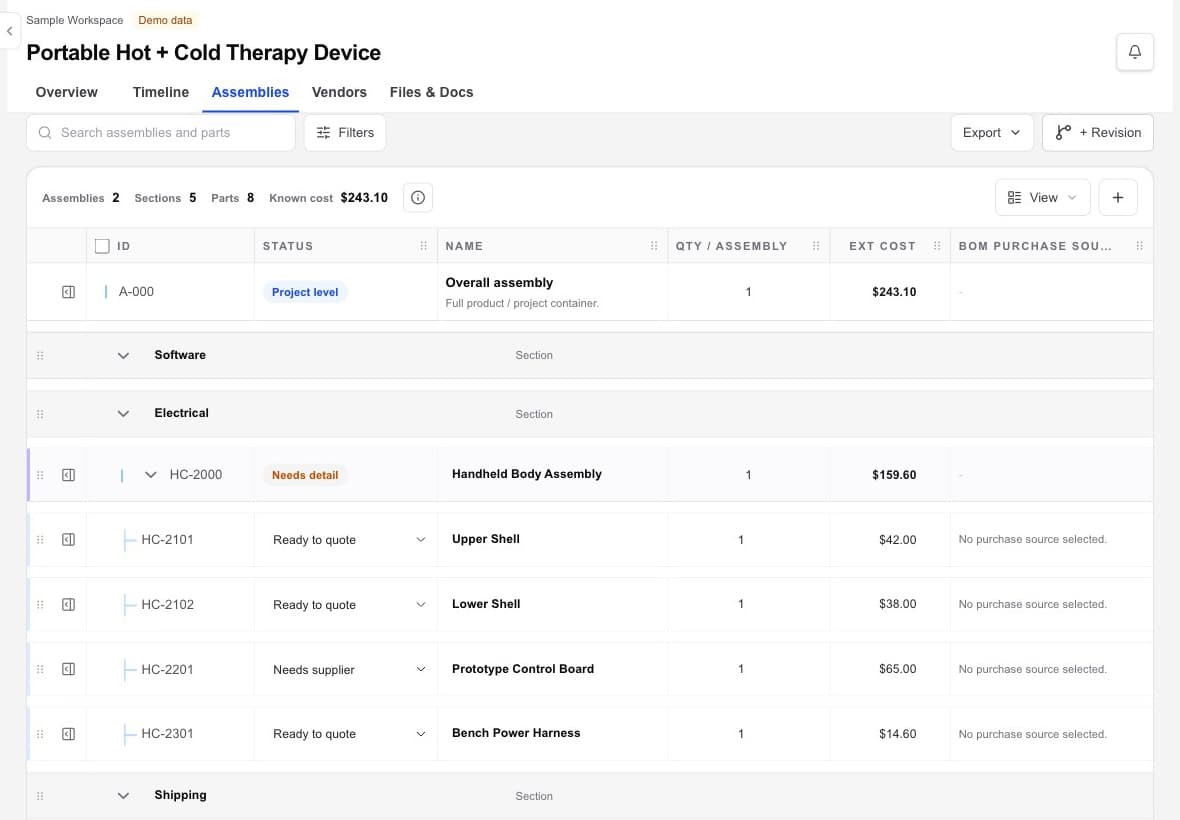
Named assembly sections
Organize the product into understandable sections, then connect each section to the files, deliverables, and outside work it needs.

Assemblies and BOM
Workbench keeps assemblies and bill-of-materials information inside the same workspace as the files, vendors, deliverables, and project context used to move the hardware project forward.
Hardware project management · design files · vendors · handoffs
The working problem
A parts list loses operational value when it is separated from the files, supplier relationships, project commitments, and decisions that explain how the product is being built.
Workbench offers practical assembly and BOM context for project delivery. It is not positioned as a replacement for advanced PLM, ERP, or configuration-management systems.
Inside the workspace
Organize the product into understandable sections, then connect each section to the files, deliverables, and outside work it needs.
Record revisions for individual items, one-off changes, or a broader product release without losing the earlier trail.
Link the design file, drawing, supplier file, quote, or vendor handoff that belongs to the assembly record.
A practical flow
Add the assemblies and working parts information the project needs to manage.
Attach the CAD, drawing, general document, or supplier file that supports the assembly.
Keep relevant vendor capability, quote, contact, and handoff context beside the product record.
Update the assembly and BOM context as deliverables, versions, and vendor decisions change.
What becomes clearer
A strong fit when
Keep exploring
Bring the hardware project together
Use Workbench to find, compare, select, and coordinate vendors. You choose whom to engage and keep control of every vendor relationship.